· Hamza · Apps · 3 min read
Best Web Browsers in 2026: Speed, Privacy, and Performance Compared
Compare the best web browsers in 2026, including Google Chrome, Microsoft Edge, Firefox, Brave, Opera, and Safari to find the right browser for your needs.
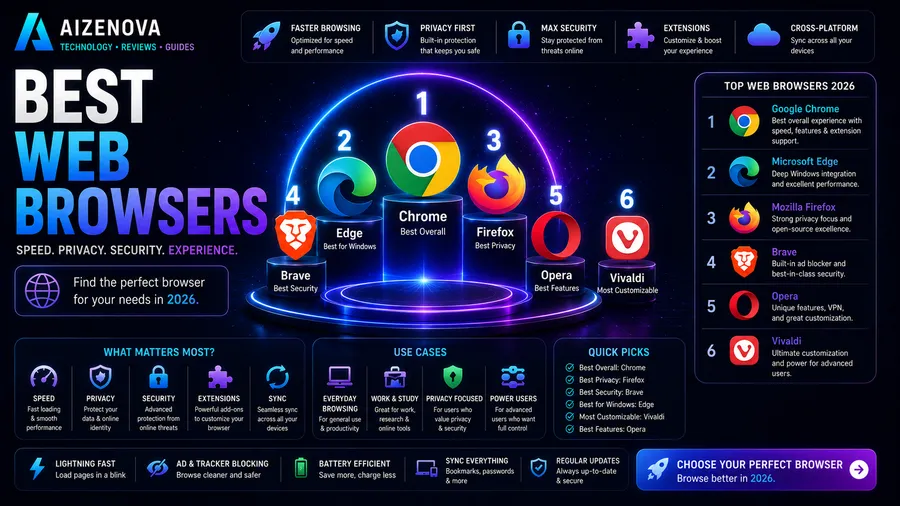
Best Web Browsers in 2026: Speed, Privacy, and Performance Compared
A web browser is one of the most important applications on any computer or smartphone. Whether you’re browsing the internet, working online, streaming videos, or using web applications, choosing the right browser can improve your speed, privacy, and overall experience.
In this guide, we’ll compare the best web browsers in 2026, highlighting their strengths, weaknesses, and ideal use cases.
What Makes a Good Web Browser?
When choosing a browser, consider these factors:
- Speed
- Privacy
- Security
- Extension support
- Memory usage
- User interface
- Cross-device synchronization
- AI features
The best browser depends on your personal priorities.
1. Google Chrome
Best Overall Browser
Pros
- Extremely fast
- Huge extension library
- Excellent website compatibility
- Sync across all devices
- Frequent updates
Cons
- High RAM usage
- Privacy concerns
Google Chrome remains the most popular browser worldwide thanks to its performance, stability, and support for nearly every modern website.
2. Microsoft Edge
Best for Windows Users
Pros
- Fast performance
- Lower memory usage than Chrome
- Built-in AI features
- Excellent PDF reader
- Strong security
Cons
- Some Microsoft integrations cannot be removed
Edge is based on Chromium, making it compatible with Chrome extensions while offering better optimization on Windows.
3. Mozilla Firefox
Best for Privacy
Pros
- Open source
- Strong privacy protection
- Independent browser engine
- Highly customizable
Cons
- Smaller extension ecosystem than Chrome
Firefox is an excellent choice for users who value privacy and open-source software.
4. Brave Browser
Best Privacy Browser
Pros
- Built-in ad blocker
- Blocks trackers automatically
- Fast browsing
- Enhanced security
Cons
- Some websites may require disabling shields
Brave focuses on protecting user privacy without sacrificing browsing speed.
5. Opera
Best Built-in Features
Pros
- Free VPN
- Built-in ad blocker
- Sidebar tools
- Battery saver
- Easy-to-use interface
Cons
- Smaller market share
Opera offers many useful features without requiring additional extensions.
6. Safari
Best for Apple Devices
Pros
- Excellent battery efficiency
- Fast performance
- Deep Apple ecosystem integration
- Strong privacy features
Cons
- Available only on Apple devices
Safari is the best browser for Mac, iPhone, and iPad users.
Browser Comparison
| Browser | Speed | Privacy | RAM Usage | Extensions |
|---|---|---|---|---|
| Google Chrome | ⭐⭐⭐⭐⭐ | ⭐⭐⭐ | High | Excellent |
| Microsoft Edge | ⭐⭐⭐⭐⭐ | ⭐⭐⭐⭐ | Medium | Excellent |
| Firefox | ⭐⭐⭐⭐ | ⭐⭐⭐⭐⭐ | Medium | Very Good |
| Brave | ⭐⭐⭐⭐⭐ | ⭐⭐⭐⭐⭐ | Medium | Excellent |
| Opera | ⭐⭐⭐⭐ | ⭐⭐⭐⭐ | Medium | Good |
| Safari | ⭐⭐⭐⭐⭐ | ⭐⭐⭐⭐ | Low | Apple Only |
Which Browser Should You Choose?
Choose Google Chrome if:
- You want maximum compatibility.
- You use many extensions.
- You rely on Google services.
Choose Microsoft Edge if:
- You use Windows.
- You want excellent performance.
- You prefer built-in AI tools.
Choose Firefox if:
- Privacy is your top priority.
- You support open-source software.
Choose Brave if:
- You want strong privacy protection.
- You dislike advertisements and trackers.
Choose Opera if:
- You want many built-in features.
- You frequently use a VPN.
Choose Safari if:
- You own a Mac, iPhone, or iPad.
- Battery life is important.
Tips for Faster Browsing
Improve your browsing experience by:
- Keeping your browser updated.
- Removing unused extensions.
- Clearing cache occasionally.
- Closing unnecessary tabs.
- Using a password manager.
- Enabling hardware acceleration.
Frequently Asked Questions
Which browser is the fastest?
Google Chrome, Microsoft Edge, and Brave are among the fastest browsers available, though performance varies depending on your device.
Which browser uses the least RAM?
Safari is highly optimized for Apple devices, while Microsoft Edge generally uses less memory than Chrome on Windows.
Which browser is the most secure?
Brave, Firefox, and Microsoft Edge provide excellent security features, including phishing protection and automatic updates.
Is Google Chrome still the best browser?
Chrome remains one of the best choices due to its speed, compatibility, and massive extension ecosystem, although privacy-focused users may prefer Firefox or Brave.
Which browser is best for privacy?
Brave and Firefox are widely regarded as the top choices for users who prioritize online privacy.
Conclusion
The best web browser in 2026 depends on your needs. Google Chrome offers the best overall experience, Microsoft Edge is an excellent choice for Windows users, Firefox and Brave lead in privacy, Opera provides useful built-in tools, and Safari remains the top option for Apple users.
No matter which browser you choose, keeping it updated and using safe browsing habits will ensure the best performance and security.