· Hamza · Programming · 4 min read
GitHub for Beginners: A Complete Guide to Version Control and Collaboration
Learn GitHub from scratch. Discover repositories, commits, branches, pull requests, Git basics, and how developers collaborate using GitHub.
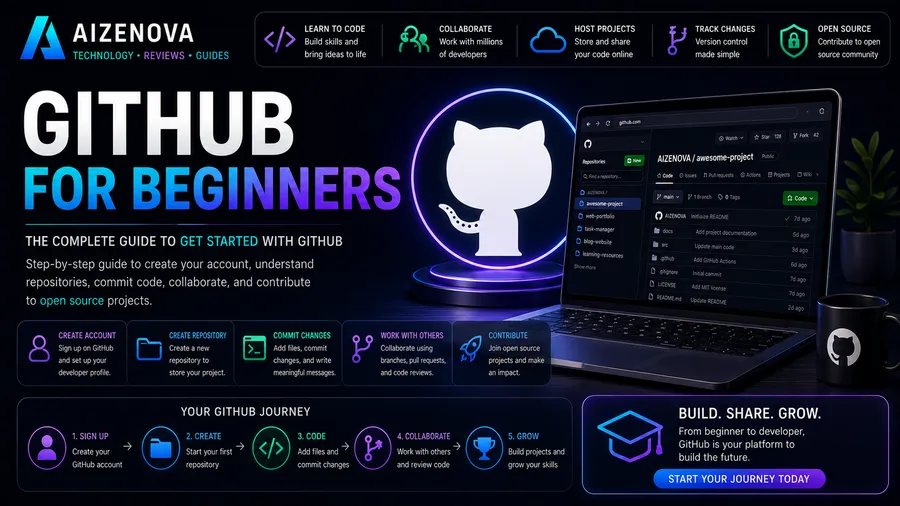
GitHub for Beginners: A Complete Guide to Version Control and Collaboration
GitHub has become one of the most important platforms for software developers. Whether you’re building websites, mobile apps, or open-source software, GitHub allows you to store your code, track changes, and collaborate with developers around the world.
If you’re new to programming, GitHub may seem confusing at first. This guide explains the basics in simple language and shows you how to start using GitHub with confidence.
What Is GitHub?
GitHub is a cloud-based platform that hosts software projects using Git, a version control system.
It allows developers to:
- Store source code
- Track code changes
- Collaborate with teams
- Manage software projects
- Review code
- Contribute to open-source projects
Millions of developers and companies use GitHub every day.
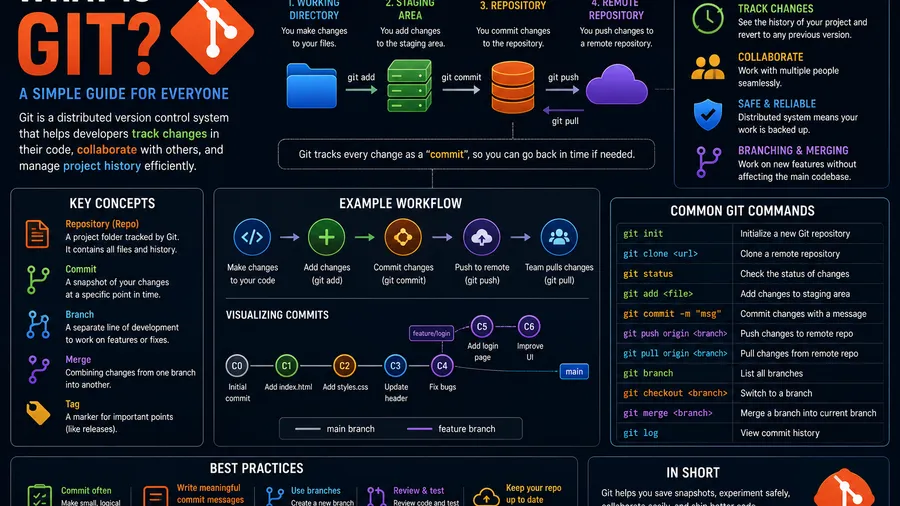
What Is Git?
Git is a distributed version control system that records changes made to your files over time.
With Git, you can:
- Save project history
- Restore previous versions
- Work on new features safely
- Collaborate without overwriting others’ work
- Track every change made to your code
Git works locally on your computer, while GitHub stores your repositories online.
Git vs GitHub
| Git | GitHub |
|---|---|
| Version control software | Cloud hosting platform |
| Installed locally | Accessible through a web browser |
| Tracks code changes | Stores Git repositories online |
| Works offline | Enables collaboration and sharing |
Git and GitHub are related but not the same thing.
What Is a Repository?
A repository (or repo) is a folder that contains your project files and Git history.
A repository may include:
- Source code
- Images
- Documentation
- Configuration files
- README file
- Project history
Every GitHub project is stored inside a repository.
Creating Your First Repository
Creating a repository is simple:
- Sign in to GitHub.
- Click New Repository.
- Enter a repository name.
- Add a description (optional).
- Choose Public or Private.
- Create the repository.
You can now upload files or connect your local project.
Installing Git
Before using GitHub effectively, install Git on your computer.
After installation, configure your identity:
git config --global user.name "Your Name"
git config --global user.email "[email protected]"
Git will now associate your changes with your account.
Essential Git Commands
Initialize a project:
git initClone a repository:
git clone https://github.com/username/project.gitCheck project status:
git statusAdd files:
git add .Create a commit:
git commit -m "Initial commit"Push changes:
git push origin mainDownload updates:
git pull origin mainThese commands form the foundation of everyday Git workflows.
Understanding Commits
A commit is a saved snapshot of your project.
Each commit records:
- What changed
- When it changed
- Who made the change
- A commit message describing the update
Example:
git commit -m "Fix login bug"Good commit messages make project history easier to understand.
Branches
Branches allow developers to work on new features without affecting the main project.
Example:
git checkout -b new-featureAfter finishing your work:
git checkout main
git merge new-feature
Branches make collaboration safer and more organized.
Pull Requests
A Pull Request (PR) is a request to merge changes from one branch into another.
A pull request allows teammates to:
- Review code
- Suggest improvements
- Discuss changes
- Approve updates
- Merge completed work
Pull requests are one of GitHub’s most important collaboration features.
README Files
A README explains what your project does.
A good README usually contains:
- Project description
- Installation instructions
- Features
- Usage examples
- Screenshots
- License information
Most repositories include a README written in Markdown.
Public vs Private Repositories
Public Repository
- Anyone can view the code.
- Ideal for open-source projects.
- Great for building a portfolio.
Private Repository
- Only invited users can access it.
- Suitable for personal or commercial projects.
GitHub allows both options.
Why Developers Use GitHub
GitHub helps developers:
- Collaborate efficiently
- Track project history
- Review code
- Share projects
- Showcase portfolios
- Contribute to open source
- Manage software development
It has become an industry standard.
Best Practices
To use GitHub effectively:
- Commit changes regularly.
- Write clear commit messages.
- Keep repositories organized.
- Create meaningful README files.
- Use branches for new features.
- Review code before merging.
- Avoid committing sensitive information like passwords or API keys.
Following these habits leads to cleaner and more maintainable projects.
Frequently Asked Questions
Is GitHub free?
Yes. GitHub offers a free plan with unlimited public repositories and private repositories, along with paid plans that provide additional collaboration and enterprise features.
Do I need to learn Git before GitHub?
Yes. Learning the basics of Git first makes GitHub much easier to understand and use.
Can beginners use GitHub?
Absolutely. GitHub is beginner-friendly, and learning it early is highly recommended for anyone interested in programming.
Why is GitHub important for developers?
GitHub helps developers manage code, collaborate with teams, contribute to open-source projects, and build a professional portfolio that can impress employers.
Is GitHub useful even if I work alone?
Yes. Even solo developers benefit from version control, project backups, and maintaining a complete history of their code changes.
Conclusion
GitHub is one of the most valuable tools every developer should learn. By combining Git’s powerful version control system with GitHub’s collaboration features, you can manage projects more efficiently, work with teams, and showcase your skills to the world.
Whether you’re learning programming, building personal projects, or preparing for a software development career, mastering GitHub is an investment that will benefit you throughout your journey.